
Television has changed dramatically. No longer are we bound to fixed schedules or limited to a single living room screen. But what is IPTV, and why has it become the future of how we watch TV?
Internet Protocol Television IPTV captures this shift in how we consume entertainment. Unlike traditional cable or satellite services that broadcast signals through physical infrastructure, IPTV delivers content through your internet connection, opening up far greater flexibility in what you watch, when you watch, and on which device.
Whether you’re weighing an IPTV subscription for the first time, comparing it to expensive cable bundles, or just curious about the technology transforming TV, this guide walks you through the essentials and how they reshape everyday viewing.
What is IPTV? Definition and How It Works
Understanding Internet Protocol Television
What is IPTV? IPTV stands for Internet Protocol Television, a system that delivers television content over internet networks instead of traditional broadcast methods like satellite dishes, cable connections, or terrestrial aerials. Rather than receiving TV signals through dedicated broadcasting infrastructure, IPTV uses the same internet connection you already rely on for browsing and streaming music. This simple shift in delivery is the foundation of what is IPTV for modern households.
The key difference is delivery. With IPTV, content travels as digital data packets through your broadband connection to your IP address, where your device, whether an IPTV box, smart TV, tablet, or smartphone, decodes and displays the programme you selected.
This internet-based approach enables features that broadcasting can’t easily match: pausing and rewinding live TV, large on-demand libraries, simultaneous viewing across devices, and experiences tuned to your preferences rather than fixed schedules. That’s why so many first-time users start by asking what is IPTV and how it differs from the TV setups they grew up with.
How IPTV Technology Works
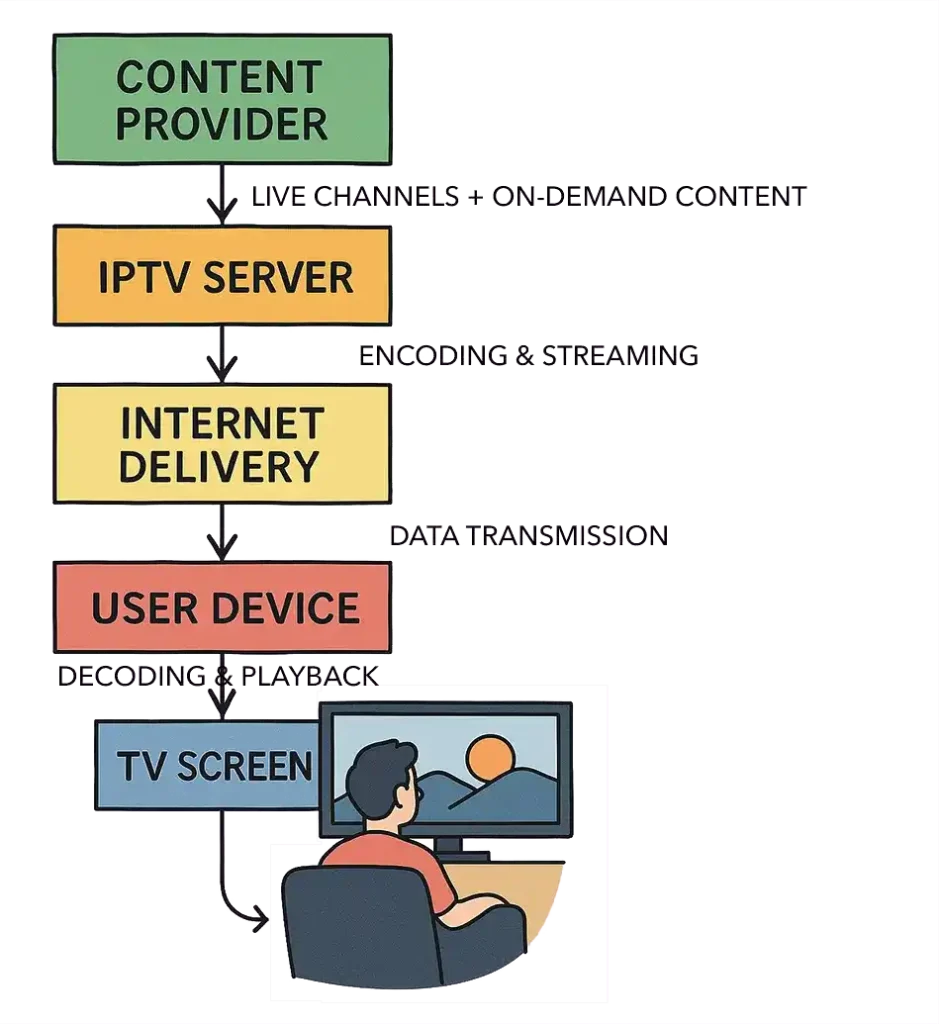
IPTV operates through a sophisticated yet seamless process, so to understand what is IPTV technology in practice, let’s break down how it actually works behind the scenes.
1. Content acquisition & preparation: Providers source programming from broadcasters, studios, and creators, then encode and compress it with modern codecs like MPEG-4 or H.264 to preserve quality while reducing size. Compressed content is stored on robust servers.
2. Streaming delivery: When you hit play, your request reaches the provider’s servers. Content is returned in small data packets using streaming protocols such as RTSP (Real Time Streaming Protocol) or HLS (HTTP Live Streaming), designed to stay smooth even as network conditions change.
3. Decoding & display: Your IPTV device, whether a dedicated IPTV box, a smart TV, or an IPTV Fire TV Stick, decodes packets in real time into the video and audio you see and hear. Modern apps like IPTV Smarters Pro handle this automatically with clean interfaces and EPG integration. This two-way connection between your device and the provider powers video on demand, catch-up TV, and personalised suggestions capabilities that traditional one-way broadcasting can’t provide.
The Main IPTV Service Types and Content Formats
Once you understand what is IPTV in simple terms, it’s easier to see the different ways it delivers content — from live channels to on-demand streaming.
-Video on Demand (VOD)
Video on Demand functions like a digital library where you select films, series, or documentaries and watch instantly. There s no waiting and no broadcast timetable, and titles remain available as long as licensing permits. VOD suits viewers who prefer to binge, pause, or revisit favourites at their own pace. Think Netflix-style services and on-demand libraries included with many IPTV subscriptions. This on-demand control is a core part of what is IPTV for everyday viewers.
-Live IPTV Streaming
Live IPTV delivers real-time channels over the internet, covering sports, breaking news, and scheduled programmes. For UK viewers, particularly, and the USA, Canada, and Europe generally, live IPTV provides access to all sports and your favorite football games, live cricket, rugby matches, and more through services specialising in live football streaming and soccer stream options, including some of the best IPTV for EFL providers that cover English Football League matches in high quality.
The advantage is flexibility — which is really what is IPTV at its core — watch on a phone during a commute or stream to a smart TV at home. Many best IPTV UK providers emphasise strong sports coverage without the cost of traditional sports packages.
-Time Shifted Media and Catch Up TV [Missed It? Watch Later]
Time-shifted viewing, often called catch-up TV, lets you access recently aired content for a limited period (commonly 7 30 days). Missed last night’s episode? Just watch it within the window, no DVR required. This format bridges live programming and on-demand convenience. UK services like BBC iPlayer showcase this model, and many IPTV subscription UK providers include catch-up alongside live channels. It’s a practical answer to what is IPTV question, for those who can’t always catch live episodes.
-Near Video on Demand (NVOD)
NVOD is a hybrid where the same title is scheduled at offset intervals, like a cinema showing the film every 30 minutes. It’s less common today, but still helpful for pay-per-view or premium events where providers want some timing control with minimal wait.
IPTV vs Traditional Cable and Satellite TV
How Content Reaches Your Screen?
IPTV uses your internet connection to stream content to compatible devices. With adequate broadband speed, you can watch on smartphones, tablets, laptops, smart TVs, or dedicated IPTV boxes wherever you are. Cable uses coaxial infrastructure to bring into your home and set a set-top box at the TV, which limits you mostly to that location. Satellite broadcasts from orbit to a dish on your property and typically requires a receiver at each TV, with limited mobility.
Device Flexibility and Mobility [Watch Anywhere, Seamlessly]
Because IPTV is internet-based, you get genuine multi-device capability. Start on the living room TV, pause, and continue on a tablet in the garden with the same subscription. Traditional models are more static; even where mobile apps exist, they often cost extra or include fewer channels.
Content Customisation Options [Pay for What You’ll Watch]
IPTV providers usually let you tailor channel groups or genres to match your interests. Sports fans can prioritise comprehensive sports, while film/series viewers can focus on entertainment libraries, paying more precisely for what they actually watch. Traditional bundles often force you to buy large packages to access a few desired channels, which increases cost and frustration.
Advantages of IPTV Over Traditional Television
Cost Effectiveness and Value [Lower Cost, Higher Flexibility]
IPTV typically costs less than cable or satellite. IPTV trials are free, and full packages rarely exceed £50-60. By contrast, traditional bundles can begin at £45-65 and climb past £100 with add-ons. You also avoid equipment rental, professional installation fees, and early termination penalties. Services like United Kingdom IPTV offer competitive tiers aligned to different budgets, keeping accessibility without sacrificing choice or quality.
Interactive Features and Control [You’re in Control]
Modern IPTV experiences include: Pause/rewind live TV, Cloud DVR available across devices, Fast forward through ads or segments, Rich EPGs with descriptions and recommendations, Multi-angle options for select sports, Parental controls by rating or time. These features turn passive viewing into a personalised, on your terms experience.
High-Quality Live Streaming [Consistent HD and 4K]
With sufficient bandwidth, IPTV consistently delivers crisp HD and increasingly 4K video with clean audio. Digital delivery avoids the noise and weather-related distortion that can affect aerial or satellite signals, leading to a more reliable picture day to day.
Multi-Device and Simultaneous Streaming
Unlike single-location traditional setups, IPTV subscriptions commonly allow multiple concurrent streams. Watch football in the lounge while someone else enjoys a drama in the bedroom, and kids stream cartoons on tablets all under one account. Typical plans allow 2- 5 simultaneous connections; premium tiers may offer more.
IPTV Devices and Players for Streaming
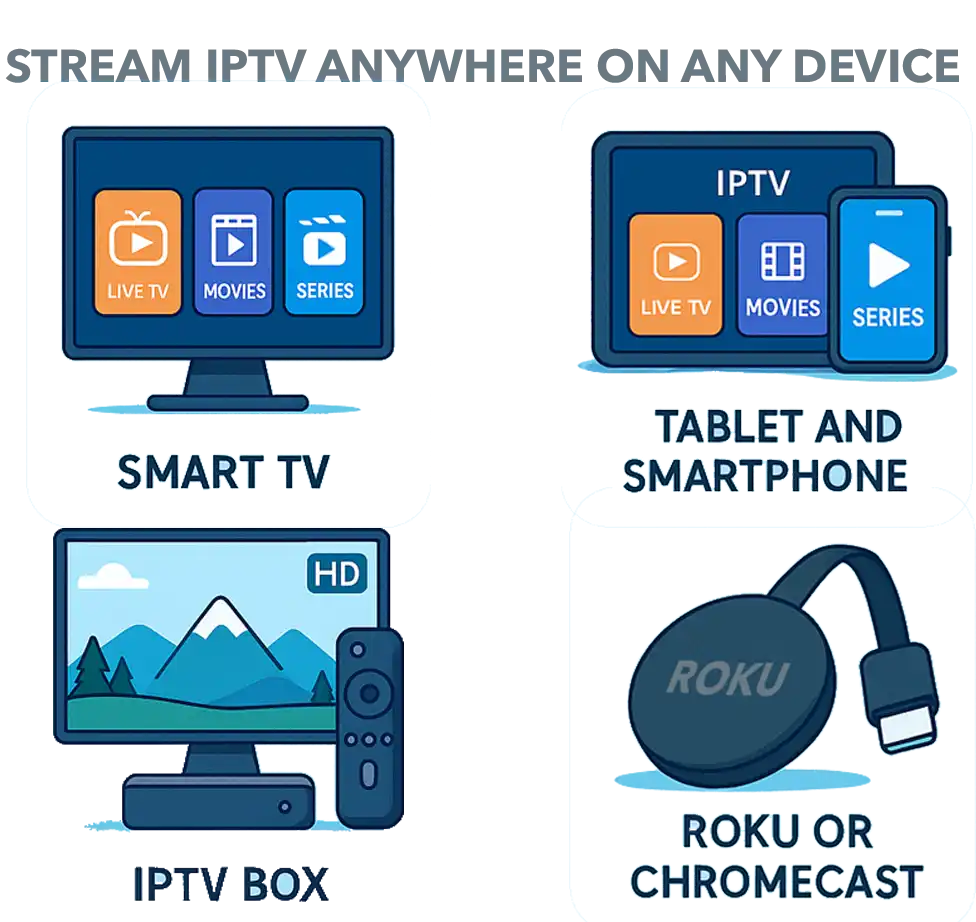
Devices You Need to Watch IPTV
To watch IPTV, you’ll need a device that can handle streaming, but don’t worry — IPTV works on practically everything these days. From your living room TV to your phone on the bus, here are the main options for enjoying internet protocol television. Once you understand what is IPTV at a basic level, choosing the right device becomes much easier.
Smart TVs
Most modern smart TVs already come ready for IPTV right out of the box. Just install an IPTV app like IPTV Smarters Pro or TiviMate, connect it to your IPTV subscription, and you’re streaming within minutes. No extra equipment needed.
Example: Launch TiviMate on your Samsung or LG smart TV, sign in with your IPTV provider details, and browse thousands of channels instantly.
IPTV Boxes
An IPTV box is a small device that plugs into your TV via HDMI, transforming any television—even older models—into a smart streaming powerhouse. These boxes are specifically designed to handle high-quality IPTV streams without lag or buffering. Popular choices include:
- Amazon Fire TV Stick: The UK favourite. Affordable (around £40-50 for the 4K version), incredibly easy to set up, and perfect for IPTV Firestick installations. Just plug it in, install your IPTV app, and start watching.
- Android TV Boxes: More processing power than a stick, ideal if you’re streaming 4K content or running multiple apps. Options range from premium (Nvidia Shield TV) to excellent budget-friendly models (£50-100).
- MAG Boxes: Purpose-built IPTV devices favoured by serious streamers who want dedicated hardware for their IPTV subscription UK services.
These boxes turn any TV into an IPTV-ready device. Simple as that.
Streaming Devices and Consoles
Already own a Roku, Chromecast, or gaming console? Good news—they work with IPTV too. Install an IPTV player app, connect to your service, and you’re sorted. Gaming consoles like PlayStation and Xbox can double as IPTV streaming devices when you’re not playing.
Mobile Devices and Tablets
Want IPTV on the go? Most IPTV services offer apps for ALL smartphones and tablets, letting you watch live football streaming during your commute or catch up on your favourite series during lunch breaks.
Example: Start watching a match on your tablet whilst waiting for your train, then seamlessly switch to your TV screen when you get home. Same stream, different device—that’s the beauty of IPTV.
Computers and Laptops
Your computer works perfectly for IPTV, too. Use apps like VLC Media Player or simply access your IPTV service through a web browser. Great for watching at your desk or when travelling with a laptop.
Essential IPTV Player Applications
Once you’ve got your device sorted, you’ll need an IPTV player app to actually watch your content—think of it as the interface between your IPTV subscription and your screen.
IPTV Smarters Pro is one of the most popular choices because it works on virtually everything: Android phones, iPhones, Fire TV Stick, Apple TV, smart TVs, tablets, Windows PCs, and Macs. It’s free, offers a clean interface with electronic programme guides, and supports multiple playlists and parental controls.
TiviMate is another favourite, especially for Android users and Fire TV Stick setups. It’s widely considered the premium IPTV player with its elegant design, multi-screen viewing, and robust recording features—though the free version covers basics perfectly.
Perfect Player appeals to those who prefer a traditional TV-style interface, mimicking classic channel surfing whilst adding modern features like favourites lists and subtitle support.
What makes these IPTV players so practical is their cross-device compatibility. Install IPTV Smarters on your Fire TV Stick for living room viewing, then use the same app on your smartphone when you’re out and about—same channels, same interface, different device. That’s what makes IPTV streaming far more flexible than traditional cable.
Legal and Safety Considerations for IPTV
Understanding Legal IPTV Services [Licensed vs. Unlicensed]
The market includes both licensed providers and unofficial services. Legitimate & Licensed services hold proper content rights. Examples include United Kingdom IPTV, fuboTV, Philo, Hulu + Live TV, and YouTube TV. In the UK, look for providers that clearly state their licensing and adherence to local regulations.
Risks of Using Unlicensed IPTV Services
Security: Sideloaded apps can bypass store screening and may include malware or spyware, risking your personal data.
Reliability: Unlicensed services provide no guarantees on uptime, quality, or support; streams may buffer during crucial moments, or the service may disappear altogether.
Legal exposure: UK copyright law can apply to end users. ISPs increasingly monitor and may issue warnings or throttle connections flagged for questionable streaming.
VPN for IPTV Privacy
A reputable VPN encrypts your connection, keeps ISPs from seeing your viewing habits, blocks certain tracking, and helps with regional restrictions. For IPTV, prioritise fast speeds (for HD/4K), no logs policies, UK servers, and compatibility with IPTV apps. Popular options include ExpressVPN, NordVPN, and Surfshark. Note: a VPN doesn’t make unlicensed content legal; it simply protects privacy for legitimate use. And with a good, powerful service, you won’t need a VPN; it will be optional
Choosing the Right IPTV Subscription [How to Pick a Solid Provider]
Content Library and Channel Selection
Identify your priorities before subscribing. Knowing what is IPTV also helps you avoid choosing a service that doesn’t match your expectations. Sports fans often look for complete coverage, including all you favorite matches, international football, cricket, rugby, and other UK-focused sports. Entertainment-oriented viewers should check the depth of each provider’s film and series libraries, while UK-centric channels essential for those who value British programming.
Pricing and Free Trial Availability
Don’t just chase the lowest price; ensure it includes what you want. Legitimate providers state costs transparently. Many offer IPTV free trial periods so you can test stream quality, channel availability, and interface usability first. Ask about stream resolution (SD/HD/4K) and server infrastructure; providers investing in solid CDNs typically buffer less. Check user reviews for uptime, buffering frequency, and responsiveness. Independent communities can be revealing.
Device Compatibility and Connection Limits
Confirm device support for your platforms. Also, verify how many devices can stream simultaneously on each tier; households with multiple viewers should choose plans with enough connections to avoid clashes. Almost all LICENSED providers provide extra plans for additional devices, which will make your streaming flexible at home. Every device has its own IPTV server
Customer Support Quality
Professional Licensed providers offer multiple support channels (email, live chat, WhatsApp) with reasonable response times. Consider sending a pre-sales question to gauge how they’ll treat you after purchase. Small test interactions can be very telling.
IPTV Requirements and Technical Considerations [What You Need for Smooth Streaaacming]
Internet Speed Requirements for IPTV
Quality depends on both speed and stability. As a general rule of thumb:
- SD streaming: ~8 Mbps minimum
- HD streaming: ~10–15 Mbps recommended
- 4K streaming: ~25 Mbps or higher
- Additional streams: add 5–10 Mbps for each extra simultaneous device
Fibre broadband in the UK usually meets these requirements easily, though rural areas should double-check and test internet speed before committing to an IPTV subscription in the UK.
Data Usage and ISP Caps
Streaming typically uses data efficiently — about 1–2 GB per hour for SD, 3–4 GB for HD, and 7–15 GB for 4K quality. If your internet plan has a data cap, frequent HD or 4K streaming may count toward that limit, but most fibre broadband users in the UK enjoy unlimited data, so it’s rarely a concern. Unlike cable TV, IPTV gives you flexible viewing on any device without the added cost of hardware or installation.
Network Quality and Buffering Issues
Even with adequate speeds, peak-time congestion, especially during major sporting events, can cause temporary buffering. Managed IPTV networks can reserve bandwidth for TV traffic; unmanaged OTT streams compete with all other internet activity. A wired connection or a strong Wi Fi 6 router often improves consistency. This is why understanding what is IPTV helps set the right expectations for smooth streaming.
📺 Popular IPTV Providers to Check Out in 2026
The IPTV streaming market continues to grow rapidly in 2026, offering viewers more choice and flexibility than ever. While there are many services available, only a few combine stability, quality, and proper licensing. Below is a curated list of reliable IPTV subscription providers known for their performance, variety, and user experience.
United Kingdom IPTV (Top Overall Choice for Sports & Entertainment — Licensed Service That Offers Quality & Stability)
Xtreme HD IPTV (Best for 4K and High-Quality Streaming)
Tellystudio IPTV (Best for Global Content and International Channels)
Apollo Group TV (Best for Premium and Exclusive Channels)
Bing TV (Best for TV Series and Entertainment)
Bunnystream (Best for Reliable VoD Content)
Trendyscreen (Best for Lifestyle and Niche Channels)
IPTV Trends (Best for Affordable Plans)
IPTVtune (Best for User-Friendly Experience)
Kemo IPTV (Best for Variety of Sports Packages)
IPTV Great (Best for Large Channel Selection)
The Future of IPTV Technology
Emerging Technologies and Features
[Smarter, Sharper, More Interactive]
AI-powered recommendations will keep improving, building personalised channels from your habits. Interactive viewing may blend shopping, social watch parties, and branching narratives. As bandwidth rises and displays improve, 8K adoption will grow IPTV is well positioned to lead due to its adaptable delivery.
Content Creator Opportunities
IPTV lowers barriers for independent creators and small studios to reach niche audiences with professional-grade channels. Fitness instructors, educators, and entertainers can build sustainable businesses without traditional broadcasting gatekeepers. No heavy technical lift is required to get started today.
Bottom Line
Internet Protocol Television marks a major evolution in how we watch. By delivering content via internet connections rather than traditional broadcasting, IPTV offers flexibility, customisation, and value that conventional cable and satellite often struggle to match. For UK households with reliable broadband, the advantages are compelling: lower costs, multi-device viewing, interactive features, and content libraries that adapt to you, not the other way around.
Whether you choose an established IPTV subscription, try a short IPTV free trial, or evaluate providers, including United Kingdom IPTV that is the Top Choice for UK viewers specifically and USA, Canada, Europe generally, the move away from traditional broadcasting can be a clear upgrade. The key is to choose licensed, reputable providers and verify what you’re getting.
With a bit of research up front, IPTV can deliver the content you want, when you want it, on the devices you prefer at a fraction of traditional TV costs. In short, what is IPTV today? It’s the evolution of television — delivering content through the internet for flexibility, personalization, and affordability.
FAQs – What is IPTV?
Some IPTV services are free, but the most reliable ones are paid. Free options usually have ads and so limited channels; also, some of them scam people. While paid ones give you better quality, all channels, and smoother streaming,they also a good support
Yes — as long as the Service has proper licenses to stream the content. Using unlicensed IPTV is illegal, so it’s always safer to stick with Verified & Licensed services.
It’s a small device that connects to your TV and lets you stream channels over the internet. Common examples are Firestick and Android TV boxes.
Verified IPTV is licensed and legal. Unverified isn’t — it might work for a while, but can disappear anytime or even get you in trouble. Always better to go verified.
You just need a good internet connection, a device like a Smart TV or Firestick, and a subscription with a trusted IPTV provider.
Because it’s cheaper, more flexible, and lets you watch what you want, when you want — no cables, no fixed schedules, just streaming freedom. That’s why everybody, especially in the UK, USA, and Europe, is switching after understanding what is IPTV.
IPTV is just television delivered the way people actually watch now — through the internet.
No satellite dishes, no cable boxes, no fixed schedules. You open an app, pick a channel, movie, or match, and it starts playing instantly on whatever device you have in your hands.What is IPTV? #1 Complete Guide to Internet Protocol Television